

How to Modify Nameservers for Your Domain at HostingRaja
Updating your nameservers enables you to direct your domain away from HostingRaja to another provider, transferring DNS zone management to the new service. This process ensures that your domain’s settings align with the hosting or service you choose. To make this change, follow these simple steps outlined below.
- Log in to your HostingRaja Client Area.
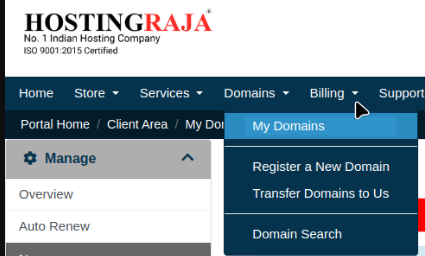
- Go to the “Domains” section.
- Click on “My Domains”.
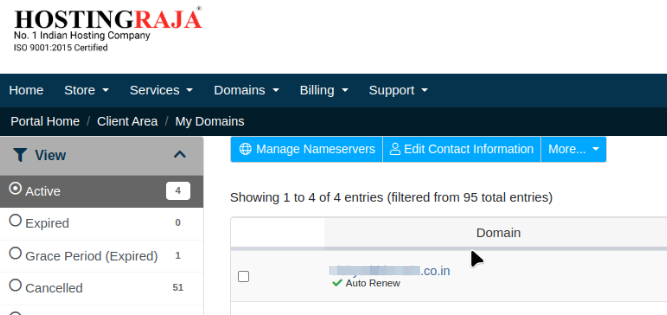
- Select your active domain.
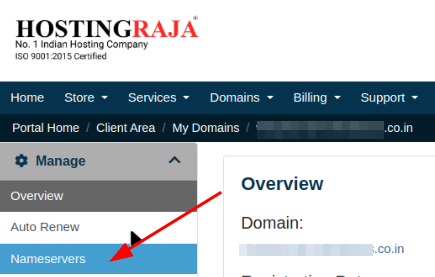
- Click on “Nameservers”.
You have two options for updating your nameservers:
- Use Default Nameservers (Recommended) – Keep your domain pointed to HostingRaja’s default nameservers for seamless management.
- Use Custom Nameservers – Select this option to point your domain to a different hosting provider. Enter up to five custom nameserver values.
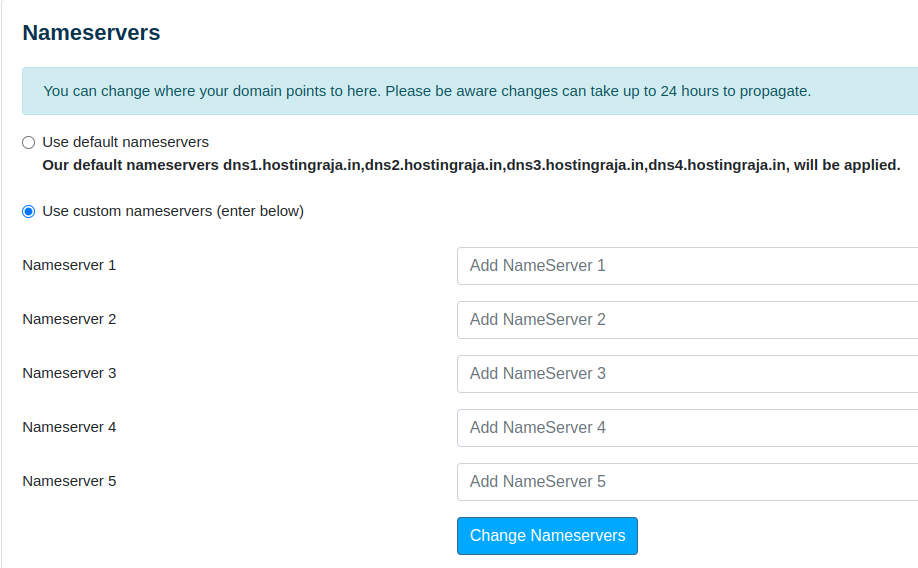
Once Entered, click on “Change Nameservers”. Changing nameservers will transfer your DNS Zone management to the new service provider – any further DNS changes should be done there.
Note: After making DNS changes, such as updating nameservers, allow up to 24-48 hours for propagation. During this time, your website and domain management may be temporarily unavailable. Typically, changes take effect within a few hours