

Domain Vs Hosting: Definition And Difference
Table of Contents
- 1 Domain Vs Hosting: Definition And Difference
- 2 How Does a Domain Name Work in the Background?
- 3 Domain Name vs Web Hosting Features and Differences
- 4 What Is Web Hosting and How Does It Work?
- 5 What Do Web Hosts Provide in Web Hosting Services?
- 6 How Do Domain and Web Hosting Work Together to Create a Website?
- 7 The Components of a Domain Name
- 8 A domain name consists of two main parts:
- 9 How Domain Names Operate in the Background
- 10 Registration and Ownership of Domain Names
- 11 Why Are Domain Names Important?
- 12 Domain Names and Domain Registration
- 13 Buy Cheap Domain Names (from Rs.499)
- 14 Importance of Domain Names for Websites and Online Business
- 15 What is Domain Registration?
- 16 Steps in Domain Registration Process
- 17 Domain Name Extensions and Types of TLDs
- 18 Protecting Your Domain Name and Domain Privacy
- 19 Structure of a Domain Name Explained
- 20 Types of Domains and Domain Extensions
- 21 Why Domain Registration Matters for Website Ownership:
- 22 Web Hosting vs Domain: Key Differences Explained for Beginners
- 23 Types of Web Hosting and Pricing Plans :
- 24 Key Features of Web Hosting Services:
- 25 How Domain and Hosting Work Together
- 26 User Types Your Domain
- 27 Browser Sends a DNS Request
- 28 Server Receives Request
- 29 Browser Renders the Website
Introduction
Domain and Web Hosting are two essential elements that are frequently mentioned while building a website. Although they collaborate to make webpages accessible, they have distinct functions.
A domain name is one of the most essential components of the internet, making it easy for users to access websites without memorizing complex numerical addresses. While it may seem like just the text you type into a browser, a domain name plays a much bigger role behind the scenes.
Technically, a domain name is a human-readable version of an IP (Internet Protocol) address. Every device connected to the internet has an IP address, such as 192.168.1.1, which computers use to communicate with each other. Because these numbers are difficult to remember, domain names act as a convenient and memorable alternative.
For example, instead of typing 173.194.223.113, users can simply enter google.com. This translation makes the internet more accessible and user-friendly.
How Does a Domain Name Work in the Background?
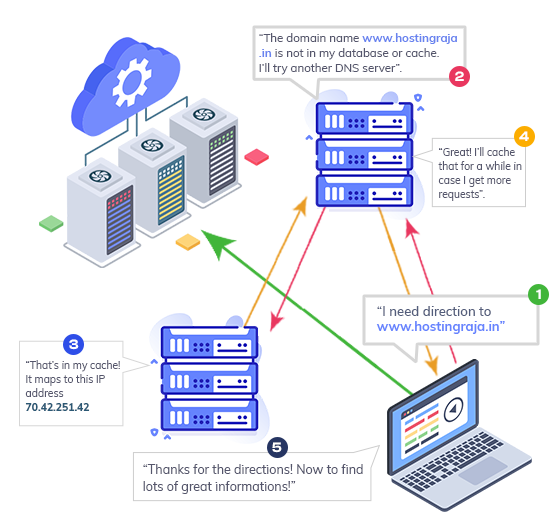
The Domain Name System (DNS) is responsible for translating domain names into IP addresses. Here’s what happens when you enter a domain name into your browser:
- Domain Name Lookup : Your browser sends a request to a DNS resolver to find the IP address linked to the domain.
- DNS Query Process : The resolver checks its cache. If the IP address isn’t found, it queries the root server, followed by the relevant Top-Level Domain (TLD) server.
- TLD Name Server Response : The TLD server (such as .com or .org) directs the request to the authoritative name server.
- IP Address Returned : The authoritative name server returns the correct IP address to the resolver.
- Website Loading : The browser uses the IP address to connect to the web hosting server and load the website files.
- Unique identifier for your website.
- Purchased via registrars like GoDaddy, Namecheap.
- Renewed yearly or longer.
- Stores your website files and data.
- Hosting providers like HostingRaja, Bluehost.
- Shared, VPS, dedicated, and cloud plans.
- Server space for website files
- Bandwidth for visitor traffic
- Security features
- Email hosting
- Technical support
- Top-Level Domain (TLD): This is the extension found at the end of the domain name, such as .com, .org, or .net.
- Second-Level Domain (SLD): This is the unique name chosen by the owner, like google in google.com.
- Together, these elements form a complete domain name, directing users to the correct IP address
- Domain Name Lookup: Your browser sends a request to a DNS resolver, a server made specifically to convert domain names into IP addresses, when you type a domain name (for instance, example.com) into the browser.
- Query for DNS: The DNS resolver looks for the domain’s IP address in its local cache. If not, it queries the root server and then other DNS servers. The location of Top-Level Domain (TLD) like .com or .org information is known to this service.
- TLD Name Server: A TLD name server, which holds data on domains under a particular TLD, receives the request from the root server. After that, the TLD server sends the request to the authoritative name server, which is in possession of the domain name’s IP address.
- IP Address Return: The DNS resolver receives the correct IP address from the authoritative name server. The browser then receives this IP address.
- Website Loading: After obtaining the IP address, the browser makes a request to the web server that houses the files on the website, and the loading process starts.
- Brand Identity: A domain name is crucial for branding. It helps establish an online identity that is easy to recognize and recall.
- Trust and Professionalism: A domain that aligns with your brand name, especially with a familiar TLD like “.com,” enhances credibility and trustworthiness.
- Search Engine Optimization (SEO): Although not the primary factor, a well-chosen domain name can improve your website’s visibility on search engines, making it easier for users to find you online.
- Spidyhost
- tmdhosting
- Bluehost
- webhostpython
- Choosing a Domain Name: Start by brainstorming domain names that reflect your business, brand, or personal project. Ensure that the name is easy to spell, memorable, and available.
- Checking Domain Availability: Use a domain registrar or domain search tool to see if the domain name you want is available. If it’s already taken, many registrars will suggest alternative TLDs or slight variations of the name.
- Selecting a Domain Registrar: Once you find an available domain name, choose a reliable registrar to complete the registration. Compare prices, customer support, and added features like privacy protection or email forwarding.
- Registering the Domain: After selecting your domain, you’ll need to provide your contact information and pay a registration fee. Typically, domain names are registered for one year, but you can opt to extend the duration.
- Pointing the Domain to a Web Host: Once your domain name is registered, you can point it to your website’s server by adjusting the DNS (Domain Name System) settings. This ensures that visitors who type in your domain will be directed to your website.
- Generic TLDs (gTLDs): Extensions like .com, .net, and .org are the most popular and widely recognized.
- Country Code TLDs (ccTLDs): These are location-specific extensions, such as .us (United States), .uk (United Kingdom), or .ca (Canada).
- New gTLDs: In recent years, newer domain extensions like .shop, .online, and .blog have been introduced, offering more options for branding.
- Subdomain: Often “www” (though optional).
- Second-level domain (SLD): The main part of the domain, like “example” in “example.com.”
- Top-level domain (TLD): The extension, such as “.com,” “.org,” or “.net.”
- www is the subdomain.
- example is the second-level domain.
- .com is the top-level domain (TLD).
- Generic Top-Level Domains (gTLDs): Extensions like “.com”, “.org”, and “.net”.
- Country Code Top-Level Domains (ccTLDs): Domain extensions that are specific to countries, such as “.in” for India or “.uk” for the United Kingdom.
- New gTLDs: Custom domains like “.tech”, “.shop”, or “.blog”.
- Brand Identity: A well-chosen domain name can strengthen your brand and improve recognition.
- Credibility: Having your own domain (instead of using a free subdomain) adds professionalism and trustworthiness to your website.
- SEO Benefits: An appropriate domain name can help with search engine optimization (SEO), making it easier for users to find your site through search engines.
- Shared Hosting: Shared Hosting is a popular and inexpensive web hosting solution in which numerous websites share a single server’s resources. This sort of hosting is perfect for small enterprises, startups, and personal websites because it is inexpensive and simple. Shared hosting prices range from ₹85.00 to ₹184.00 per month.
- VPS hosting: A physical server is virtually partitioned, providing users with a private environment and dedicated resources. This hosting type is ideal for websites with medium-to-high traffic. VPS hosting rates range from ₹549.00 to ₹1699.00 per month.
- Web Hosting: Web hosting costs between ₹59.00 and ₹184.00 a month and allows multiple websites to share a single physical server with limited storage and resources. Shared hosting is the most cheap option available and is ideal for small businesses or personal websites.
- WordPress hosting: It offers an optimised environment, performance, and security for hosting WordPress websites. This hosting package includes WordPress-specific functionality and customisation choices, allowing you to simply manage and build your website. WordPress managed hosting options range from ₹99.00 to ₹149.00 per month.
- Disk Space: Storage for your website’s files and data.
- Bandwidth: The amount of data transfer allowed between your website and its visitors.
- Control Panel: A user-friendly interface for managing your website and server settings.
- Security: Features like SSL certificates, firewalls, and regular backups to protect your data.
-

KINGSTON AJITH
Senior Content Writer @ HostingRajaA seasoned Senior Content Writer with over 5 years of experience in the tech industry, specializing in web hosting. Passionate about creating unique, high-quality content for articles, blogs, and web pages. As a dedicated learner, continually improving writing skills and overseeing all online content and communications to ensure quality and consistency.
Domain Name vs Web Hosting Features and Differences
| Feature | Domain Name | Web Hosting |
|---|---|---|
| Description | A domain name is the online address that visitors enter into a browser to access your website. | Web hosting is where your website’s files (HTML, photos, and videos) are stored. |
| Function | Functions as a digital address, directing visitors to your site. | Makes your website available to users via the internet by storing your website files. |
| Key Features |
|
|
| Example Providers | GoDaddy, Namecheap, Google Domains | HostingRaja, Bluehost, SiteGround |
What Is Web Hosting and How Does It Work?
Web hosting is the service that stores your website’s data and delivers it to users when they visit your domain. Hosting providers use powerful servers that stay online 24/7 to ensure your website is always accessible.
What Do Web Hosts Provide in Web Hosting Services?
How Do Domain and Web Hosting Work Together to Create a Website?
A domain name and web hosting must work together for a website to function. The domain name points users to the hosting server through DNS settings. Without hosting, a domain has nothing to display. Without a domain, users have no easy way to access the hosted website.
The Components of a Domain Name
A domain name consists of two main parts:
How Domain Names Operate in the Background
Registration and Ownership of Domain Names
A domain name must be registered with a domain registrar in order to be used. The rights to use a certain domain name for a predetermined amount of time, usually a year or more, are purchased when someone registers a domain. After registration is finished, the DNS links the domain to a particular IP address.
Well-known domain registrars provide simple tools for managing, renewing, and registering domain names. You can hold the right to use a domain name, but in order to keep ownership, you will need to renew your registration on a regular basis.
Why Are Domain Names Important?
Domain names are critical to the functioning of the internet. They simplify navigation for users and contribute to branding and online presence. Businesses and individuals rely on memorable domain names to enhance user experience and improve search engine visibility. A well-chosen domain name can increase website traffic and credibility.
Domain Names and Domain Registration
In order to create an online presence, a domain name is necessary. It serves as a memorable and user-friendly representation of your brand or company, acting as a digital address that guides consumers to your website. Users would have to memorise complex numerical IP addresses in order to access a website in the absence of a domain name. Rather than entering “216.58.217.206” to access Google’s homepage, individuals can instead type “google.com.”
Importance of Domain Names for Websites and Online Business
The importance of a domain name cannot be overstated in the digital world:
What is Domain Registration?
Domain registration is the process of reserving a domain name on the internet for a specific period, typically one year or more. To register a domain name, you need to go through a domain registrar—an organization that manages the reservation of internet domain names. Some popular domain registrars include:
When you register a domain name, you own the exclusive right to use it for your website, emails, or other online platforms.
Steps in Domain Registration Process
Domain Name Extensions and Types of TLDs
Domain names come with various extensions or TLDs. Here are some common categories:
Protecting Your Domain Name and Domain Privacy
Once registered, it’s essential to protect your domain name. Many registrars offer domain privacy protection, which hides your personal information (such as name and contact details) from being publicly displayed in the WHOIS database, a global database of registered domain names.
You should also monitor your domain’s expiration date. If you don’t renew your domain registration on time, it could be purchased by someone else, leading to a loss of ownership.
Structure of a Domain Name Explained
A domain name is typically structured in three parts:
For example, in www.example.com:
Types of Domains and Domain Extensions
Finding the ideal extension can be facilitated by being aware of all your alternatives if you wish to register a domain name. Here are the main types of domain names:
| TLD | Registration | Renewal | Transfer |
|---|---|---|---|
| .com | ₹950.00 | ₹1050.00 | ₹1050.00 |
| .co.uk | ₹670.00 | ₹670.00 | ₹670.00 |
| .info | ₹1564.00 | ₹1564.00 | ₹1564.00 |
| .net | ₹1260.00 | ₹1260.00 | ₹1260.00 |
| .xyz | ₹1999.00 | ₹1999.00 | ₹1999.00 |
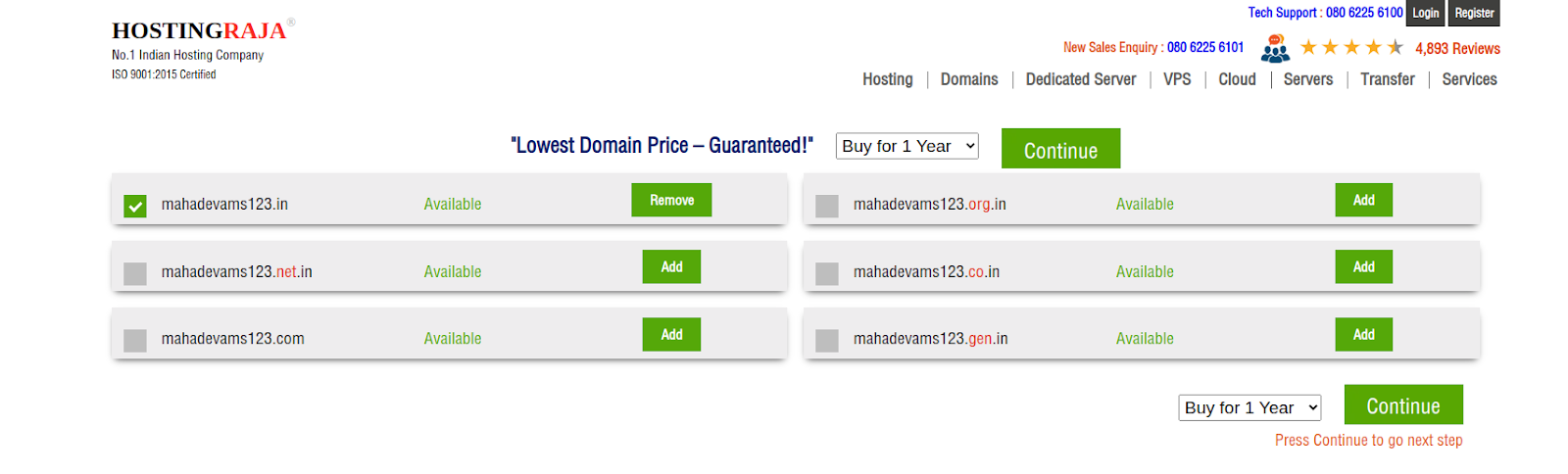
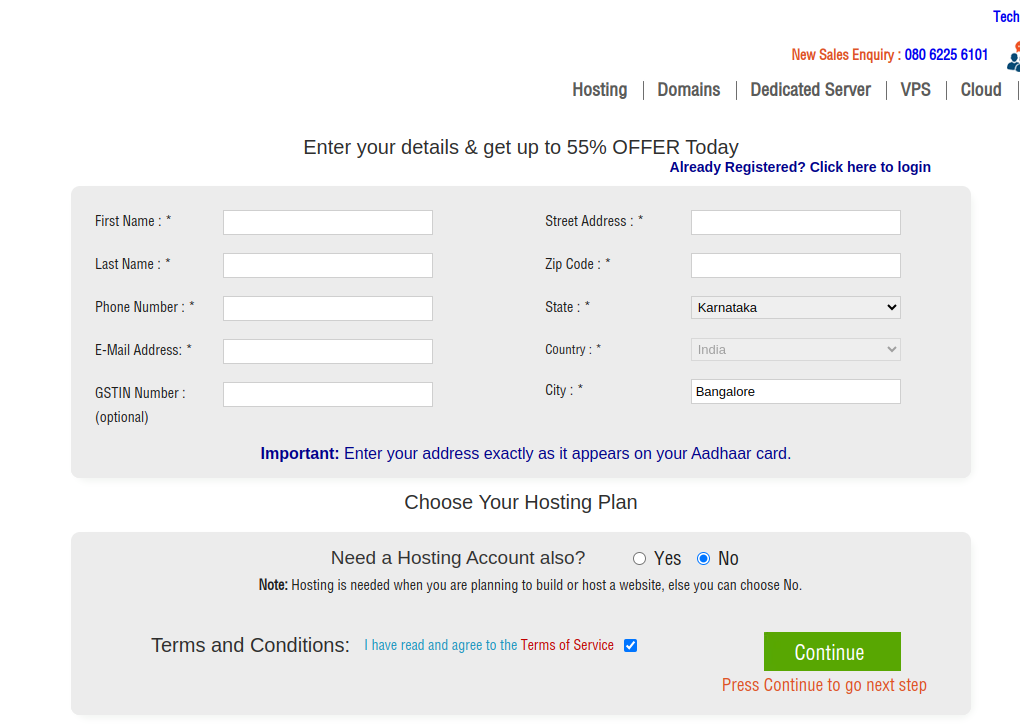
Once you’ve found an acceptable alternative, register it. To register a domain name with HostingRaja, check the price of domain and click the Add to Cart button next to your desired domain name.

Why Domain Registration Matters for Website Ownership:
Web Hosting vs Domain: Key Differences Explained for Beginners
Domain Privacy:
When registering a domain, your personal contact details (such as name, address, and email) are listed in the public WHOIS directory. Many registrars offer domain privacy protection, which replaces your personal information with generic contact details to protect your privacy.
Web hosting refers to a service that allows individuals or organizations to store their website files (such as HTML, images, and other multimedia content) on a server that is accessible via the internet. This server is provided by a web hosting company, which offers the technology and infrastructure needed to ensure that a website is available online 24/7.
When someone types your website’s domain name (like www.Hostingraja.com) into their browser, their computer connects to the web server where your site is hosted, retrieving the files necessary to display the website.
Types of Web Hosting and Pricing Plans :
Key Features of Web Hosting Services:
Choosing the right web hosting depends on the size, traffic, and complexity of your website. For example, shared hosting is cost-effective for smaller websites, while larger websites with high traffic may benefit from dedicated or cloud hosting.
A domain name and web hosting work together to create a website by serving two distinct roles in making your site accessible on the internet.
Domain Name: This is the address of your website (e.g., www.Hostingraja.com) that people type into their web browsers to access your site. It’s like the digital address for your business or blog, helping visitors locate your website. You purchase and register a domain name through a domain registrar.
Web Hosting: This is the physical space where your website’s files, such as HTML, images, and videos, are stored. When a user enters your domain name, the web hosting server delivers the stored files to their browser, allowing the website to be displayed.
How Domain and Hosting Work Together
User Types Your Domain
A user types your domain name into their browser.
Browser Sends a DNS Request
The browser sends a request to the DNS (Domain Name System), which looks up the IP address of the server hosting your website.
Server Receives Request
The server (provided by your web host) receives the request and sends the website files to the browser.
Browser Renders the Website
The browser renders the files, and the user can now view the website.
Essentially, the domain name acts as the “address” of your website, while web hosting is the “home” where all the website’s content is stored and managed. Together, they enable visitors to easily find and view your website.